
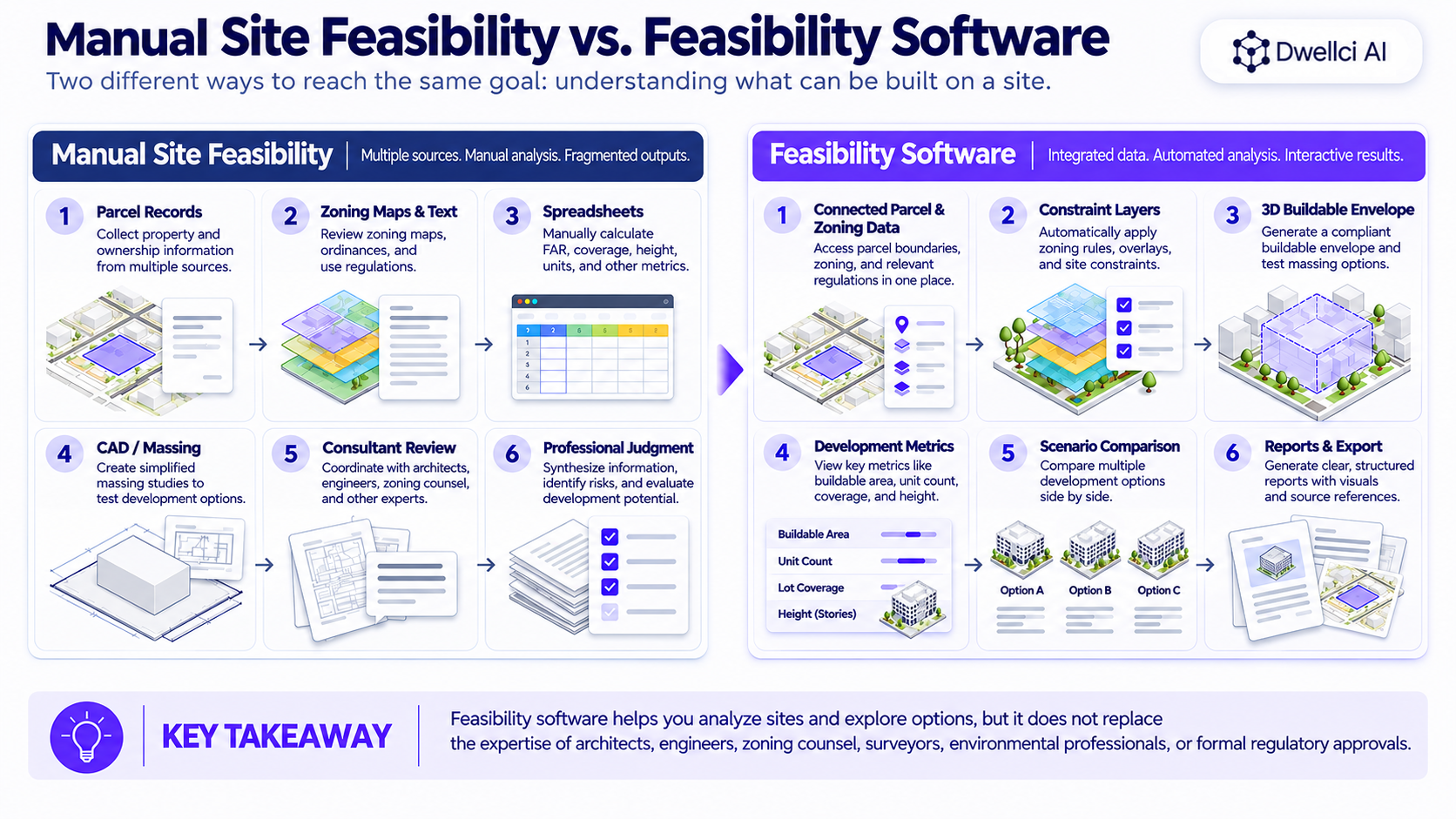
Manual site feasibility and feasibility software solve the same early development problem in different ways: turning parcel, zoning, constraints, and project assumptions into a defensible view of what a site may support. Manual workflows rely heavily on people assembling data, interpreting rules, calculating metrics, and building scenarios. Software can automate or accelerate parts of that process, especially repetitive screening, scenario testing, visualization, and recalculation.
The useful question is not:
“Should developers replace manual feasibility with software?”
It is:
“Which parts of feasibility should be automated, and which still require professional judgment and verification?”
Manual feasibility is often better for:
Feasibility software is often better for:
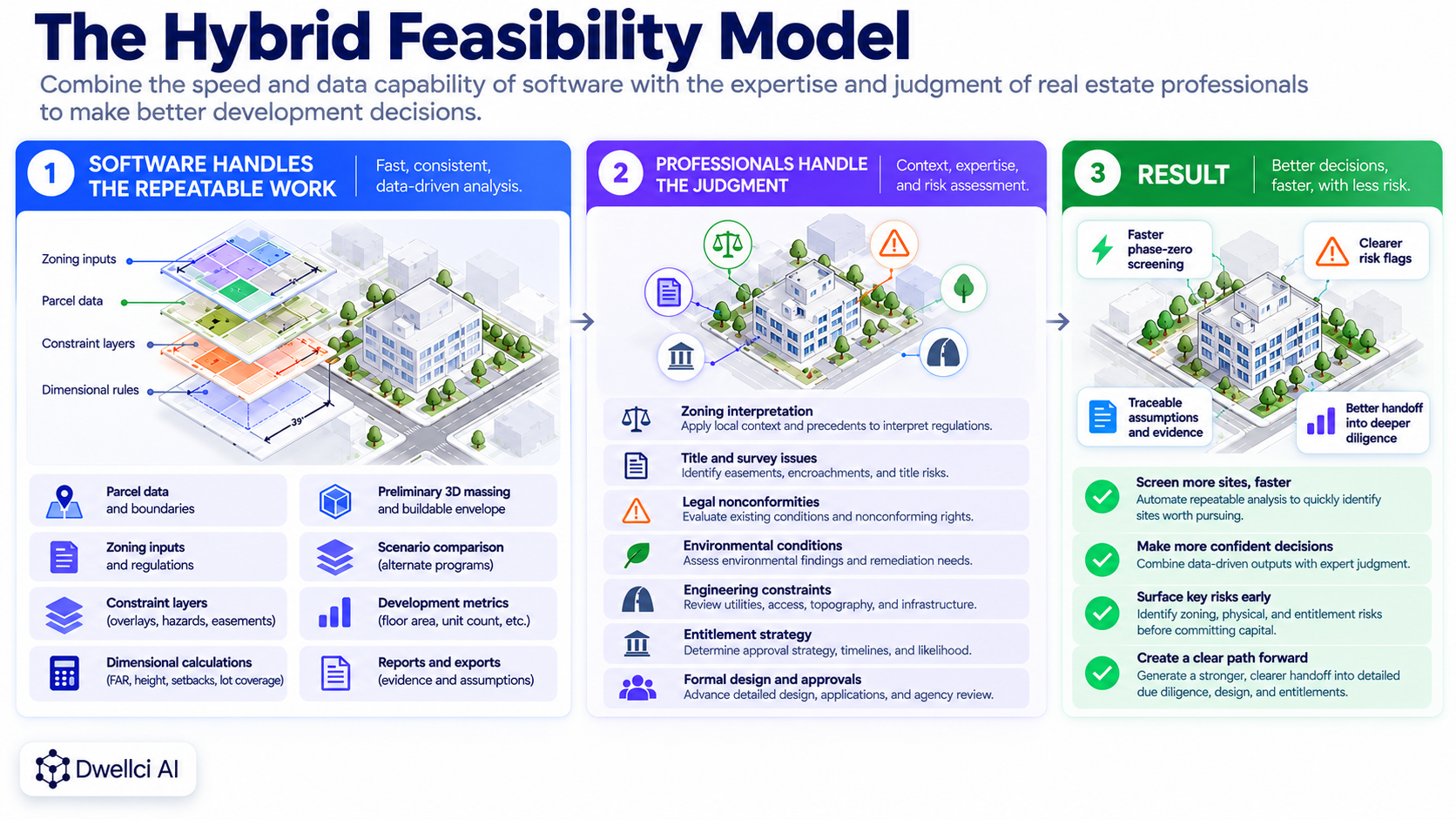
The strongest workflow is usually hybrid: software handles repeatable analysis and iteration, while qualified professionals verify material interpretations and resolve the issues that require judgment.
A traditional early feasibility process often requires a developer, architect, planner, engineer, or consultant to gather information from multiple sources and assemble the analysis manually.
That may include:
Housing Toolbox describes a similar predevelopment process: preliminary site evaluation, local and state regulatory review, preliminary engineering and conceptual site design, and preliminary financial feasibility. Its predevelopment guidance illustrates how many separate workstreams can feed an early site decision.
The issue is not that the individual calculations are always difficult.
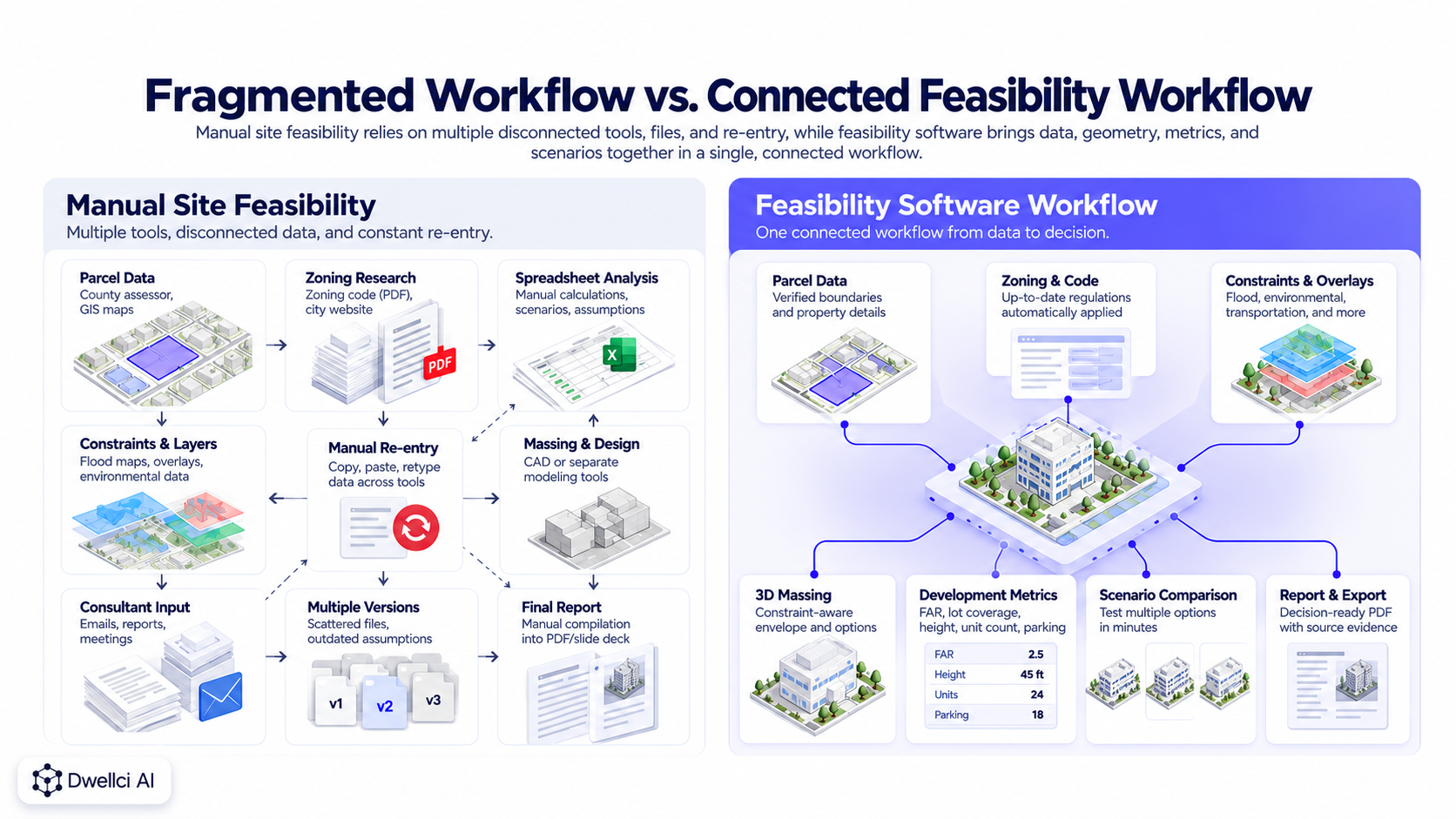
The delay often comes from fragmentation.
A manual workflow may require the team to move between:
Each handoff creates another place where information has to be re-entered, interpreted, checked, or updated.
If one assumption changes—for example, parking, setbacks, FAR, unit mix, or lot coverage—the team may need to update several separate calculations and drawings.
Manual analysis remains essential when the answer depends on interpretation rather than simple calculation.
Examples include:
Software may identify an issue or model an assumption, but the material conclusion may still need zoning counsel, an architect, surveyor, engineer, environmental professional, or agency confirmation.
Feasibility software can bring multiple early-stage tasks into one repeatable workflow.
Depending on the platform, capabilities may include:
Current platforms illustrate this range. Autodesk Forma Site Design combines site context, 3D modeling, area and density metrics, environmental analysis, and alternative comparison for early planning and feasibility. Autodesk's current Forma Site Design overview describes those capabilities.
TestFit similarly markets parcel setup, site constraints, massing, zoning and environmental data, automated scenario generation, scheme comparison, and pro forma tools as part of its feasibility workflow. TestFit's Site Solver overview provides another example.
A major advantage of feasibility software is the ability to centralize data that would otherwise be collected manually from several systems.
Instead of repeatedly transferring parcel dimensions, zoning values, constraints, and development assumptions between tools, the platform can keep those inputs connected to the same site model.
This matters because the value of automation is not only faster input.
It is also faster updating.
If an assumption changes, connected calculations and geometry can update together rather than being rebuilt in separate files.
Manual feasibility often encourages teams to test only a small number of scenarios because every additional option consumes design and calculation time.
Software can reduce the marginal effort required to test:
Autodesk describes Forma Site Design as allowing teams to create, iterate, and compare multiple massing proposals while tracking area metrics automatically. Its feasibility workflow is a current example.
TestFit describes a similar benefit through automated design options and saved schemes that can be compared using real-time development metrics. Its product documentation demonstrates how scenario iteration has become a core category feature.
When every property is evaluated manually by a different person or consultant, the structure of the analysis can vary.
One site may be evaluated by FAR, another by unit count, and another by a hand-drawn massing study.
A repeatable software workflow can establish a consistent set of outputs such as:
That consistency can make acquisition comparison more reliable.
For a full site-comparison framework, see How to Compare Development Sites Before Acquisition.
One of the biggest weaknesses of a spreadsheet-only workflow is that zoning metrics can become detached from physical fit.
A spreadsheet may correctly calculate:
10,000 SF lot × 3.0 FAR = 30,000 SF
But it does not automatically prove that 30,000 square feet can fit within the applicable setbacks, lot coverage, height, access, and site constraints.
Feasibility software that connects the metrics to a 2D or 3D site model can make that conflict visible earlier.
This is why buildable-envelope and massing analysis are so important.
Manual workflows are vulnerable to version drift.
A zoning assumption may change in one spreadsheet while an older massing diagram or presentation still reflects the previous value.
In an integrated feasibility model, changing one input can update the related geometry and metrics together.
That does not guarantee that the input itself is correct.
But it reduces the risk that different parts of the analysis are based on different versions of the same assumption.
A table of zoning numbers may be technically correct but difficult for an acquisition team or investor to interpret quickly.
Visual outputs can make the result easier to understand through:
This makes feasibility more useful as a decision and communication tool—not just an analyst's calculation.
Software is only as useful as its data, rule logic, assumptions, and scope.
Common risks include:
The existence of a polished 3D model does not make every underlying assumption correct.
Automation can amplify both good and bad inputs.
If an incorrect FAR, parcel boundary, setback, or use assumption is entered manually, the resulting model may still look precise.
This is why a strong software workflow should make it possible to distinguish:
The faster a team can generate scenarios, the more important it becomes to understand which inputs deserve trust.
Zoning codes are not always machine-readable rule sets.
They can include:
A feasibility platform can organize, apply, or surface those rules, but material ambiguities may still require professional review.
For this reason, software should support defensible diligence rather than create false certainty.
A more manual, professional-led workflow may be appropriate when:
In these cases, software can still help organize or visualize the analysis, but it should not replace the deeper work.
Software becomes particularly valuable when a developer needs to:
This is especially relevant for developers evaluating a steady pipeline of infill opportunities where the same core feasibility questions recur from site to site.
The most useful distinction is not manual or software.
It is what should be automated and what should remain a professional decision.
A strong hybrid workflow can look like this:
That approach preserves judgment while reducing repetitive work.
Phase-zero development is fundamentally an information-compression problem.
A developer has to combine parcel, zoning, site constraints, geometry, development assumptions, and risk into one early decision.
Manual processes can do this well, but often through several tools and handoffs.
Feasibility software can compress those steps into a more connected workflow, which makes it easier to repeat the process across more opportunities.
For the phase-zero framework, see What Is Phase-Zero Development?.
A useful evaluation checklist includes:
The best platform is the one that fits the team's actual decision stage—not necessarily the one with the longest feature list.

These categories overlap, but they are not identical.
Feasibility software is primarily concerned with early questions such as:
Architectural design software goes much deeper into building design, documentation, detailing, coordination, and construction information.
Autodesk itself distinguishes early site planning and feasibility in Forma Site Design from downstream detailed design workflows. Its current product materials describe Forma as supporting early site analysis and concept development before models move further into tools such as Revit. Autodesk's 2026 workflow update reinforces that distinction.
A zoning lookup tool answers a narrower question:
What zoning information applies here?
Feasibility software should go further:
What do those rules and site conditions produce on this parcel?
That distinction is important because a zoning designation, FAR value, or permitted-use table does not by itself establish practical development capacity.
See Zoning Lookup vs. Development Feasibility Analysis.
Whether the work is manual or software-assisted, a useful output should document:
See What Should a Real Estate Feasibility Report Include? for the complete structure.
Dwellci AI is designed around phase-zero development feasibility.
The platform combines parcel intelligence, zoning analysis, site constraints, and zoning-backed 3D massing so developers can move from:
“What does the zoning say?”
to:
“What does this site appear capable of supporting, and what still needs to be verified?”
Dwellci is intended to move that question earlier and make the workflow more repeatable—not to replace the professionals required for formal design, legal interpretation, engineering, environmental diligence, survey, or approvals.
No. Early feasibility software can support site screening, zoning analysis, massing, and scenario comparison, but it does not replace architectural design or the professional responsibility required for detailed project work.
No. Software can organize and apply zoning information, but ambiguous interpretations, special approvals, legal nonconformities, entitlement strategy, and other material legal questions may require qualified land-use or zoning counsel.
Not automatically. Accuracy depends on the quality of the data, assumptions, rule interpretation, modeling method, and review. A manual spreadsheet can contain errors, and software can contain incomplete data or logic. The strongest process makes important inputs traceable and verifies material assumptions.
It is particularly valuable during repeated site screening, site comparison, scenario testing, and early acquisition analysis—when developers need consistent answers quickly enough to decide where deeper professional diligence is justified.
Yes, when the project requires it. Feasibility software can help teams identify the issues and opportunities earlier, while architects, engineers, surveyors, environmental professionals, zoning counsel, and other specialists resolve the questions that require formal expertise.